Author: admin

  • Video Tutorials for Everyone

    Basic and Gold members receive, pre-installed access, in their dashboard to the following video tutorials:

    • The Dashboard
    • Posts vs. Pages
    • The Editor
    • Creating a New Post
    • Post Formats
    • Edit an Existing Post
    • Using Categories and Tags
    • Creating and Editing Pages
    • Add Photos and Images
    • How to Embed Video
    • Using the Media Library
    • Managing Comments
    • Creating Links
    • Changing the Theme
    • Adding Widgets
    • Custom Menus
    • Installing Plugins
    • Adding New Users
    • Useful Tools
    • Settings & Configuration

    Each are professional and clearly understood.  For anyone needing assistance with how to build a WordPress website, this is the place to start.  We have them made upon every major WordPress release.  To give you an idea of how often WordPress releases upgraded, there could easily be six major releases in any given year!

    [s2If !current_user_can(access_s2member_level0)]Welcome Guest, You will need to [footer_loginout] to view more content on this page.  If you’re not yet a member let’s get started.[/s2If]

    [s2If is_user_logged_in()][s2Get constant=”S2MEMBER_CURRENT_USER_FIRST_NAME” /] [s2Get constant=”S2MEMBER_CURRENT_USER_LAST_NAME” /], To view videos, go to your dashboard: dashboard>>video tutorials  It will be at or near the last item on the left hand menu.[/s2If]
  • Basic WordPress Website

    Basic WordPress Website

    ONEvoiceBasicBox4Basic WordPress Website

    $15/mo

    BASIC– Designed to fill the needs of many people, but not all. You will have a fully functioning website/blog to add, edit or delete (posts, video, photos and more), 24 hours a day. With our Basic website, you’ll be able to create a professional looking site, just like Gold, but without advanced plugins. If you are wanting a basic website/blog, this may do all you need. When compared to the well-advertised website creators, our lowest level has more features than most all their plans. When a basic website is ordered, a technician will create your site (often, it takes 24-48 hours).

    [color-button href=”https://onevoicefamily.com/order#order”]PURCHASE[/color-button]

    Features:

    • ✓ – Free setup

    • ✓ – Cancel at any Time

    • ✓ – Self-Designed

    • ✓ – Hosting Included

    • ✓ – Choice of 62 Premium Themes

    • ✓ – Unlimited Pages

    • ✓ – Unlimited Posts

    • ✓ – Support

    • ✓ – Free Image Editing Software (PhotoShop)

    [/one-fourth]

  • Free Image Editing Software/Tools to Edit your Website Images

    Free Image Editing Software/Tools to Edit your Website Images


    Although we own editing suites for videos, pictures, photography and other images, we choose to use the above online image editor to create many of our more basic images (e.g. create logos with transparent backgrounds, posters, advertising banners, remove/replace image backgrounds, and other basic functions)!  It’s called Pixlr Editor, from Autodesk®; it’s fast, powerful, functions/operates much like PhotoShop® software from Adobe, and it’s free.  You don’t have to register to use it; it’s online and powerful enough to create/edit/save/download stunning images.

    With their written permission, and for your convenience, we provide this valuable resource free to anyone; even if you don’t subscribe to either of our services!  This tool is powerful but if for some reason you need more, try their premium tools.

    Below are some tutorials to help learn how to use Pixlr:

    http://vimeo.com/68925405

    1vfcb2360x80B

    Free PhotoShop® software from Adobe

  • Developers You Can Trust

    Developers You Can Trust

    img-8Creating a WordPress blog is simple with Genesis, but many people still prefer to outsource it. Or you may want a customized design, or even a designed-from-scratch look and feel that reflects your own brand.

    We are happy to provide talented, reliable freelance design work to give you the exact look you want.  If for some reason, we aren’t able to provide a specific service, we maintain a list of talented, reliable freelance WordPress designers and developers that you can hire to give you the exact look you want.

  • Genesis Has Custom Widgets and Layout Options

    Genesis Has Custom Widgets and Layout Options

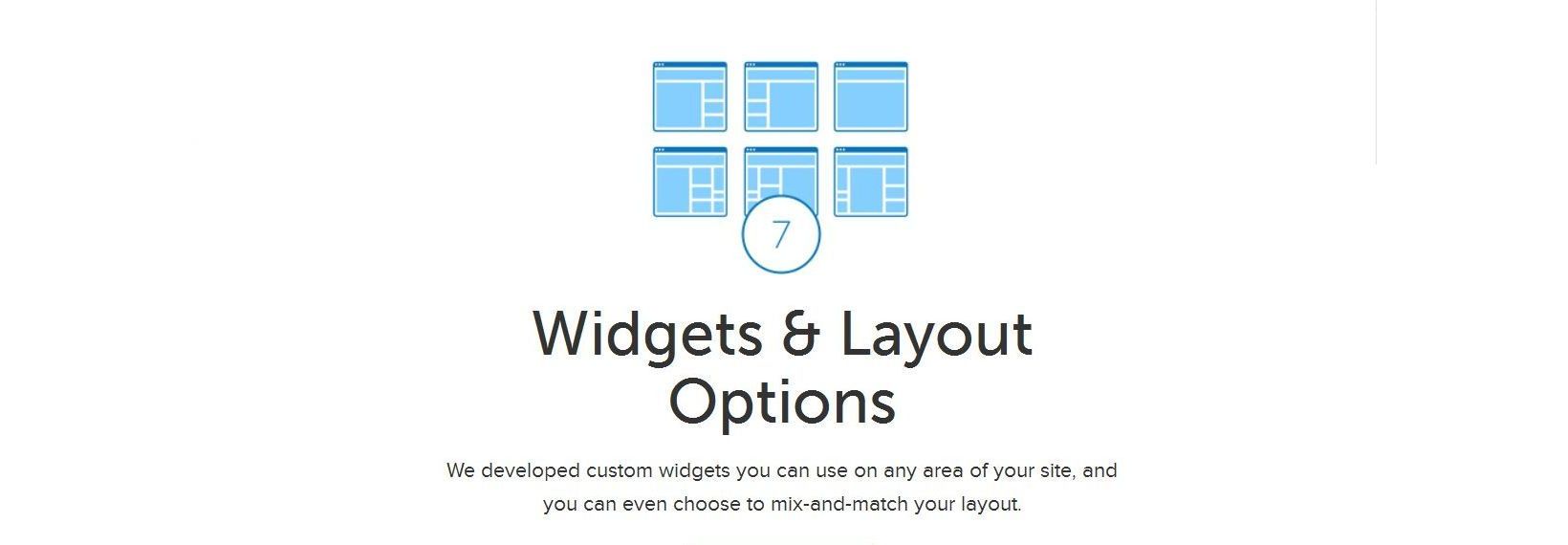
    img-7aBecause the Genesis Framework has been widgetized beyond just the sidebar, we developed some custom widgets for you to use on any area of your site. Here’s a list of the custom widgets available with the Genesis Framework.
     

    User Profile

    – displays the Gravatar of a user, as well as their bio and a link to an About page.

    Featured Posts

    – displays post excerpts and a thumbnail to be used in a featured section.

    Featured Page

    – displays page excerpts and a thumbnail to be used in a featured section.


    img-7b

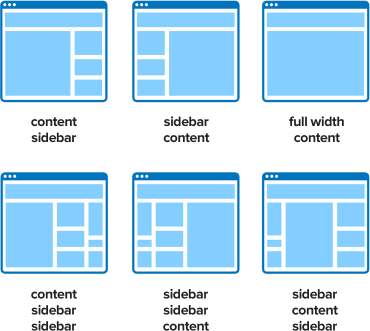
    Another great feature is that you can “mix and match” your layout. This means you can choose, via a radio button, any of the 6 layouts for each one of your individual pages or posts.

    You’re no longer limited to one layout for your entire site! These are easily selected on the Theme Settings page and give you the flexibility with all themes (Genesis parent and any child themes) to choose whichever layout you want as the default.

  • Genesis Makes Site Customization Easy … Without Sacrificing Speed

    Genesis Makes Site Customization Easy … Without Sacrificing Speed

    img-6Genesis offers features to make it simple to set up your site exactly the way you want it. And if you change your mind later, you’re just a few clicks away from creating new sections and functions. But unlike other frameworks, you don’t have to sacrifice performance for options.

    Nothing slows down a site like bloated code, but we obsess about making Genesis cleaner and more lightweight. Web page load times are usually discussed in seconds, but page load times for sites built on Genesis can often be measured and discussed in milliseconds. And in 2014, that’s an essential difference.

    [one-half-first]

    Widget Ready

    WordPress widgets are the quick and easy way to add powerful functionality to your site. Without having to know anything about code, you can use simple widgets to add sidebars, social media sharing buttons, opt-in forms, and much more.

    [/one-half-first][one-half]

    Theme Options

    Want to change your site layout? Choose an alternative color scheme? All of these options and more can be selected from a dropdown box. Adjusting these critical options is easy, and your site is updated instantly.

    [/one-half]

    [one-half-first]

    Comment Functionality

    Comments are a great way to build engagement and loyalty with your readers. Our themes give your readers a great comment experience, including threaded comments and Gravatar integration.

    [/one-half-first][one-half]

    Ready For Advertising

    Most of our themes are ready for advertising. Just insert your advertising code, like Google AdSense, Azoogle Ads, Clicksor, or any others, into a text widget and start collecting your advertising revenue.

    [/one-half]

    [one-half-first]

    Auto-Sized Featured Images

    There are millions of websites out there. If you want yours to stand out, you need to draw attention to your blog and articles … and nothing sparks interest better than using great images. But image management and creating thumbnails can sometimes be a hassle. We’ve made thumbnails simple by integrating our themes to use WordPress’ featured image capability.

    [/one-half-first][one-half]

    WordPress and Theme Tutorials

    Want to go a bit further with WordPress? Want to get even more out of Genesis? Our tutorials will teach you all you need to know:

    [/one-half]